Decision Matrix: Definition, Types, Examples, and How to Create One
Gain a better understanding of using a decision matrix with this comprehensive guide and learn how to effectively apply it to improve business operations.

Gain a better understanding of using a decision matrix with this comprehensive guide and learn how to effectively apply it to improve business operations.
Published 28 Apr 2026
Article by
8 min read
A decision matrix is a decision-making tool used to systematically evaluate and prioritize a list of options based on multiple criteria. It generally involves listing options along one axis and criteria along another, assigning weights to criteria based on their importance, and scoring each option against these criteria.
A decision matrix should be used when there are quantifiable options. As opposed to SWOT analysis, which uses a qualitative approach to assess factors affecting strategies, this tool helps break down complicated problems into manageable parts. It’s ideal for significant decisions with long-term effects or major resource investments, such as choosing a business strategy, selecting vendors, or making career choices.
Additionally, it can be used alongside a prioritization matrix. Teams can also maximize the capabilities of a decision-making matrix when:
Comparing options with a set of similar criteria
Narrowing down multiple options into one
Quantifying the weight of important factors
Logically approaching decisions
Cultivate a culture of excellence with our digital solutions that enhance efficiency, agility, and continuous improvement across all operations.
Using a structured approach to decision making is important because it provides an objective framework for making complex decisions involving multiple options and criteria. By visually organizing options against weighted criteria, it helps reduce bias and decision fatigue, ensuring that decisions are data-driven and aligned with key priorities.
Here are the common types of decision matrices that can be used:
A weighted decision matrix assigns weights to each criterion based on its importance. Each option is then scored against these criteria, and the weighted scores are summed to identify the best choice.
This method helps in prioritizing options when certain factors are more significant than others. It’s also one of the most widely used methods for making decisions, as it provides a structured and quantitative approach.
The Pugh Decision Matrix is a tool devised by Scottish scientist Dr. Stuart Pugh to formalize the decision-making process. It compares multiple options against a baseline or reference option. Each alternative is rated as better (+), worse (-), or the same (0 or s) as the baseline for each criterion. It’s useful for narrowing down choices in early decision-making stages.
Criteria | Baseline | Weight | A | B | C | D | |
1 | 0 | 4 | 0 | -4 | 0 | +4 | |
2 | 0 | 5 | +5 | 0 | -5 | 0 | |
3 | 0 | 2 | -2 | +2 | 0 | 0 | |
4 | 0 | 3 | +3 | 0 | 0 | -3 |
Example of a Pugh Decision Matrix
A cost-benefit matrix systematically lists all relevant costs (including direct, indirect, and opportunity costs) and benefits (both tangible and intangible) for each alternative, often assigning numerical values to quantify them. This matrix allows decision-makers to visually assess the balance between costs and expected benefits, making it easier to identify which option offers the most favorable economic outcome.
The Eisenhower Decision Matrix was designed by former United States President Dwight D. Eisenhower. This decision-making matrix, also known as the Urgent-Important Matrix, helped him arrange his tasks and make tough decisions during his term.
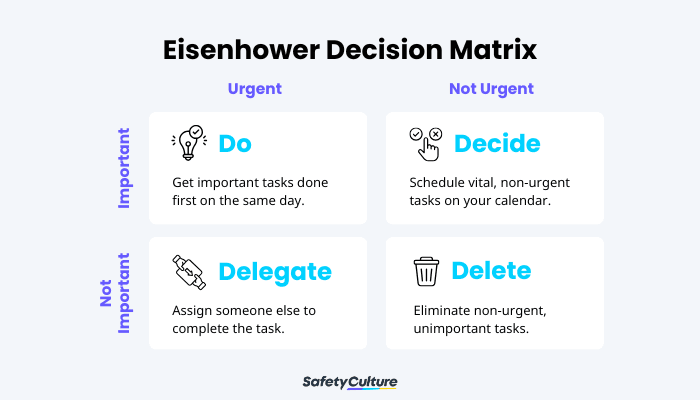
True to its name, the Eisenhower Decision Matrix helps sort tasks by urgency and importance. By working in this order, people can maximize their productivity.
A decision matrix is a great tool to visualize how options weigh against each other given a set of criteria. To maximize its effectiveness, it’s important to know how to properly create it. Here is an example of how to build and use a weighted decision matrix:
Start building a decision matrix by drafting a list of the choices you will decide between. In this step, it is important to:
Brainstorm all possible options - Gather every potential solution or choice related to the decision. Try not to judge or eliminate ideas too early; the goal is to capture all realistic possibilities.
Ensure options are distinct and comparable - Each option should be clearly defined and measurable against the same set of criteria. Avoid overlapping choices, as this can make the evaluation confusing.
Check for completeness - Review your list to make sure no feasible alternative has been left out. A comprehensive list leads to a more accurate and reliable decision.
The next step is to write down the factors crucial to the decision. It’s best to include factors crucial in deciding the best route. Having a set of criteria helps you select the best option and avoid subjectivity in decision-making.
For example, you’re a project manager who needs to hire a construction agency for a commercial building project. To deliver this project successfully, you’re looking for the following things in an agency from most to least important:
Experience: How long have they been working in the industry? What is their reputation among the industry circles?
Customer reviews: What do their customers say about their service?
Expertise: What buildings do they specialize in?
Cost-effectiveness: How much do you need to shell out for this project?
After consolidating the choices and factors to consider, you can start building the decision matrix. Its tabular structure allows you to see various possibilities when weighing options. You can make this from scratch, or you can use a ready-made template for convenience.
First, fill in the top row with the options. Then, write down the criteria for decision-making in the columns.
Build from scratch or choose from our collection of free, ready-to-download, and customizable templates.
The next step after building the skeleton of the decision matrix is adding weight to each factor. This part quantifies how important a criterion is to the final decision.
You can rank each factor according to the number of considerations they have. A classic example is using the 1-5 scale, with 5 being the most important factor and 1 being the least important one.
Following the example from Step 2, a project manager who has narrowed down their options to three agencies would plot these options on a decision matrix, here’s what they would look like:
Weight | Agency 1 | Agency 2 | Agency 3 | |
Experience | ||||
Expertise | ||||
Cost-effectiveness | ||||
Customer reviews | ||||
TOTAL |
Table 1. Initial Decision Matrix Example
After ranking each factor, you must weigh each option against the criteria. Still following the example from the previous steps, consider that the project manager has started comparing the different agencies:
Agency 1 is quite expensive, but it has stellar customer reviews and a fair amount of experience in the industry. However, it specializes in residential buildings.
Agency 2 specializes in commercial buildings and is cost-effective. However, it lacks enough experience. Moreover, it receives average scores in customer reviews.
Agency 3 is not the most expensive, but it isn’t the most cost-effective out of the three options. It has good reviews from customers and a substantial amount of experience and skills in commercial buildings.
For this decision matrix, you will use the following scales:
Weight: 1 = least important, 4 = most important
Rating: 1 = low, 2 = fair/average, 3 = high
Using the information listed in this section, observe the initial scores in Table 2.
Weight | Agency 1 | Agency 2 | Agency 3 | |
Experience | 4 | 2 | 1 | 3 |
Expertise | 2 | 1 | 2 | 3 |
Cost-effectiveness | 1 | 1 | 3 | 2 |
Customer reviews | 3 | 3 | 2 | 2 |
TOTAL |
Table 2. Decision Matrix Example with Initial Scores
After rating all the options, you must multiply the score by the assigned weight in Step 4 and 5. The resulting numbers will show the weighted score—that is, the rating of each option in relation to the established criteria.
Lastly, once the weighted scores are complete, it’s time to combine the scores. Find the total score by adding the weighted points of each option. The alternative with the highest number of points becomes your best route based on your criteria.
In the provided example, the multiplication of the score and the overall result would look like this:
Weight | Agency 1 | Agency 2 | Agency 3 | |
Experience | 4 | 2 x 4 = 8 | 1 x 4 = 4 | 3 x 4 = 12 |
Expertise | 2 | 1 x 2 = 2 | 2 x 2 = 4 | 3 x 2 = 6 |
Cost-effectiveness | 1 | 1 x 1 = 1 | 3 x 1 = 3 | 2 x 1 = 2 |
Customer reviews | 3 | 3 x 3 = 9 | 2 x 3 = 6 | 2 x 3 = 6 |
TOTAL | 20 | 17 | 26 |
Table 3. Decision Matrix Example with Total Scores
The project manager in this case will highly consider Agency 3, as the total score shows the highest result. However, it’s important to keep in mind that the final decision remains in your hands. This decision matrix is simply a tool that will help you select the best choice if you want to evaluate your options objectively.
SafetyCulture is a mobile-first operations platform adopted across industries such as manufacturing, mining, construction, retail, and hospitality. It’s designed to equip leaders and working teams with the knowledge and tools to do their best work—to the safest and highest standard.
Streamline processes, eliminate bottlenecks, enhance resource utilization, and build an agile and scalable infrastructure with SafetyCulture. Strive for operational excellence to boost competitive advantage, foster sustainable growth, and deliver long-term value.
Save time and reduce costs
Stay on top of risks and incidents
Boost productivity and efficiency
Enhance communication and collaboration
Discover improvement opportunities
Make data-driven business decisions