Automation Process: A Guide for Operations Teams
Learn what an automation process is, how it works, and how to implement one that can enhance efficiency and productivity.

Learn what an automation process is, how it works, and how to implement one that can enhance efficiency and productivity.
Published 12 May 2026
Article by
10 min read
An automation process refers to the use of software and control systems to complete repetitive, rules-based tasks with minimal human involvement. The technology reduces manual work by carrying out processes on its own once it receives a pre-determined trigger or condition. This allows workflows to run at a consistent speed that would’ve otherwise been compromised by human error or limited team abilities.
There are four main types of automation processes, each suited to a different level of operational structure and volume. Knowing which type fits certain workflows helps tailor automation to an organization’s needs.
Fixed automation involves running a fixed, dedicated set of tasks at a certain volume and time. It’s for operations that don’t change, such as assembly lines that produce one product at a predictable rate. This helps organizations working under Good Manufacturing Practices to maintain controlled, high-volume production environments. As a result, they can meet ISO 9001:2015 consistency requirements.
Programmable automation uses software-controlled systems that can be changed between production runs. It's well-suited to batch production, where settings and instructions change depending on the product being made. Reprogramming takes time, so it works best when product changeovers are planned rather than frequent. Each batch still requires its own validation and inspection checkpoints to meet quality control standards.
Flexible automation handles a range of products or tasks with quick, low-effort reprogramming between runs. Unlike programmable automation, changeovers happen fast enough to support mixed production without significant downtime. It gives frontline teams the ability to respond to changing demand without rebuilding the process from scratch. Make sure to apply compliance obligations and OSHA machine safety standards, even if the system switches frequently.
Integrated automation connects every part of a production or operational environment through a central control system. It brings together all machines, sensors, software, and data to work together as a coordinated system. The approach is a fit for organizations that heavily rely on visibility and real-time data. However, it creates security and privacy risks, so it’s best to align this with cybersecurity and information security control standards.
Cultivate a culture of excellence with our digital solutions that enhance efficiency, agility, and continuous improvement across all operations.
Process automation and Robotic Process Automation (RPA) differ in scope, focus, and application within operations. Process automation is broader, covering physical systems, machines, software, and data integration across procedures. Meanwhile, RPA is a subcategory that uses software bots to handle specific, repetitive digital tasks.
Here’s a more detailed guide to differentiate the two:
Aspect | Process automation | RPA |
Scope | Entire production processes across physical and digital systems | Simple recurring digital-based tasks |
Technology used | Machinery, sensors, PLCs, software, data integration platforms | Software bots that mimic how a person would work |
IT Involvement | Requires significant input and development from IT | Bots can work without deep system changes |
Best suited for | Complex, multi-system operations and production environments | Repetitive digital tasks like data entry, email replies, and system queries |
Human intervention | Requires human monitoring and oversight | Can be left to handle low-impact structured tasks |
An organization should adopt an automation process when they have repetitive, standardized processes prone to human delay, error, or compliance gaps. These are processes that take longer than they should and produce inconsistent results.
Common scenarios where automation delivers the most immediate value include:
Compliance reporting: Manually compiling audit data across multiple sites takes days and leads to lapses in information.
Approval workflows: Purchase orders, permit requests, and budget sign-offs often take longer before they’re approved, which can create bottlenecks and delays.
Incident and hazard reporting: Frontline teams logging safety issues through disconnected tools creates gaps in the incident management record.
Operational inspections: Scheduling, completing, and following up on site inspections manually is time-consuming and easy to overlook.
Onboarding and training sign-offs: Tracking whether new employees have completed required health and safety training across multiple locations is difficult to manage manually.
Process automation, with a bespoke, holistic approach like process design, should provide several advantages for any business that employs it correctly.
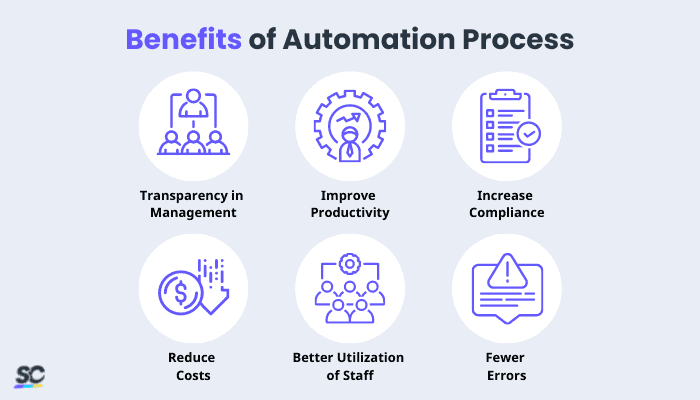
The day-to-day operations may soon become all management cares about; management details may bury the company’s overall plan. Owners can clearly understand their business and its functions by sitting down, going through process workflows, and implementing the automation process. Established procedures provide deeper insight into the company and the potential for future growth.
Business process automation is still the key to increasing productivity in businesses. Automation removes bottlenecks and eliminates time-consuming manual operations, minimizing lead time.
System automation improves compliance and conformity, whether inside or outside an organization’s policy and standards. Processes are not the same as other things. There are no corners cut, no steps missed, or steps forgotten in a process because everything happens automatically. An automation process should be an essential part of everyday operations for any company with governance, risk, or compliance issues.
An automated process is also an ideal part of everyday operations for any company looking to improve project planning and execution consistency for a more efficient process approach.
The most notable advantages of process automation are its cost-cutting potential. When processes are automated, there is no longer a need to hire as many staff.
Automation can take over most repetitive tasks that human employees would otherwise complete. With process automation, businesses can also enjoy reduced facilities costs and other associated expenses.
It is more efficient for employees to work in vital parts of the business. They will be happier and more satisfied as a result of this, resulting in improved company outcomes.
When errors occur, they may cause concern and create difficulties for a business. While resolving minor mistakes or an incorrect address is typical, it consumes time unnecessarily. In the long run, such issues could damage the company’s bottom line, customer satisfaction, and labor costs. Automation eliminates a lot of room for mistakes.
Automation, like any other process or software, has its issues. This section explores the potential challenges arising from the automation process.
Several factors contribute to this issue’s complexity:
Employees’ resistance to adopting automation processes
Limitations of tools (for example, inability to handle unstructured data)
Variations to procedures or unusual complexity are common
Management’s lack of strategic direction
Interfaces are changing, or automation is breaking down
Solution: It is possible to resolve any issues by doing the research phase correctly and ensuring staff approval. However, with business and software’s dynamic nature, the system must be checked for faults regularly and improved as necessary.
Software testing is crucial to ensure that no breakdowns in procedures occur. Moreover, it’s vital that senior IT or management should be present regularly to maintain processes in place or advise when improvements or adjustments are required.
Automation projects fall short when tasks aren’t fully mapped out and evaluated for what needs to be resolved and prevented. When teams skip through stages in the implementation plan, they overlook reliability and productivity issues within the process that the automation is supposed to address.
Solution: Document the entire process and the people involved in running it. If a step can’t be recorded clearly, it can’t be automated reliably. Build systems based on the documentation, and deploy them once it passes tests.
A common error companies make is deploying automation systems to all processes at the same time. This sets up the project for failure. With too many processes changing at once, teams have no time to understand their new workflows.
Solution: Pick one process to automate first. Ideally, it should be a procedure that is well-known and properly documented. Use the learnings from this first automation project to guide the succeeding rollouts into other processes.
Utilize advanced sensor technology to monitor assets, automate vital alerts, implement actions, and report urgent issues.
Many projects fail to establish goals and Key Performance Indicators (KPI) at the beginning. After the system is in place, maintaining those procedures and achieving goals becomes a challenge. However, when processes are no longer automated, this is when things go wrong. A worker determines that a step has been overlooked and decides to complete each activity daily manually. Alternatively, the procedure becomes so sluggish that the two-day goal slides and turns into a five-day process.
Solutions: The system will require ongoing monitoring and management. Once put in place, the system may need to be altered or modified; it is essential to embrace change.
Implementing an automation process follows a structured approach that ensures continuous and efficient work. Regardless of industry or business, these five steps guide the path from assessment to full deployment.

Implementation starts by analyzing existing processes to find repetitive, rule-based, and time-consuming tasks. These are procedures like data logging, approval routing, and quality checks. Routine, recurring tasks are fit for automation as they’re high-volume, time-sensitive, and prone to human error. Identifying these types of work reveals points of operational delay and rework that can be automated out.
It’s crucial to define what the automation implementation must improve, as it clarifies the goals of the change and aligns it with targets that leadership cares about. This could be shortening cycle times, reducing error rates, or correcting compliance. Stating a clear automation goal makes it easier to benchmark return on investment and prevents uncontrolled project growth.
The right automation tools are the ones that are compatible with existing systems, scale with potential operational growth, and are intuitive for workers to actually use. It’s best to adopt resources that won’t require a total overhaul of the current operation. At the same time, the evaluation should find the option that can handle sensitive data, in compliance with ISO/IEC 27001:2022 information security controls.
One way to ensure smooth change management during rollout is to run comprehensive automation tests that simulate real-world conditions. Stressing the system catches data errors, timing issues, and integration gaps before it’s deployed in production. It’s also crucial to train frontline teams beforehand on how to use and troubleshoot the system. Operations training minimizes resistance and failures to adoption once automation is fully integrated.
Rather than introducing process automation all at once, roll out the system to a single process or team. Doing so eases implementation and provides an opportunity to see how the automation looks in practice, while maintaining a small scale. Monitor adoption and performance analytics, then review where the automation needs fixes. Afterwards, deploy the system to more operational segments and repeat the evaluation process.
SafetyCulture is an operations platform adopted across industries such as manufacturing, mining, construction, retail, and hospitality. It’s designed to equip leaders and working teams with the knowledge and tools to do their best work—to the safest and highest standard.
Streamline processes, eliminate bottlenecks, enhance resource utilization, and build an agile and scalable infrastructure with SafetyCulture. Strive for operational excellence to boost competitive advantage, foster sustainable growth, and deliver long-term value.
✓ Save time and reduce costs
✓ Stay on top of risks and incidents
✓ Boost productivity and efficiency
✓ Enhance communication and collaboration
✓ Discover improvement opportunities
✓ Make data-driven business decisions
In this article