Types of Forms: What You Need to Know
Understand the main purpose of forms and explore how each type of form can simplify the way you perform business processes.

Understand the main purpose of forms and explore how each type of form can simplify the way you perform business processes.
Published 27 Apr 2026
Article by
7 min read
Forms are printed or digital documents with blank spaces or fields designed for users to input specific information in an organized way. It’s like a template that streamlines data gathering for businesses, governments, or organizations, turning a large bulk of information into something easy to process and analyze.
Forms offer a variety of uses that cater to different types of businesses. Listed below are the types of forms you’ll commonly find in the SafeyCulture template library, along with their uses and purposes.
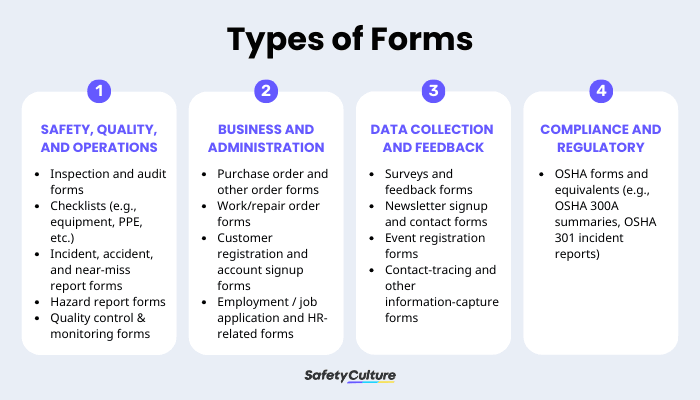
Inspection and audit forms are used to systematically check whether a site, process, or facility meets safety, quality, and compliance standards. They help you spot risks early, demonstrate due diligence to regulators, and ensure every location is inspected consistently. Submission of these forms is considered a best practice that supports compliance with OSHA’s General Duty Clause.
These types of forms are often confused with checklists, but they serve a different purpose during inspections and audits. While checklists capture the essential items to be reviewed, inspection and audit forms provide additional context. Beyond listing the checklist items, it includes signatures, scores, photos, corrective actions, and final conclusions, which add depth and detail to the overall report.
Examples:
Construction site safety audit and inspection forms
Weekly site safety inspection and audit forms
Checklists serve as a step-by-step list for recurring tasks like equipment checks, PPE readiness, vehicle inspections, kitchen sanitation, and building walkthroughs. They reduce human error, standardize how work is done, and make it easier to prove that checks really happened.
Some inspection and audit checklists are also listed as forms, primarily because checklist items are often included in general inspection and audit reports. It provides a concrete outline for corrective actions and guides inspectors in consistently verifying compliance across all required areas.
Examples:
PPE checklists
Warehouse safety checklists
Hotel room inspection checklists
Build from scratch or choose from our collection of free, ready-to-download, and customizable templates.
These forms document incidents of injury, damage, or near misses. They’re critical for root‑cause analysis, legal and regulatory reporting, and ensuring corrective actions are tracked to prevent the incident from happening again.
These report forms are important tools for evaluating safety standards on construction sites, warehouses, and manufacturing facilities. They often capture the details of accidents and incidents, including what happened, where it occurred, and why it took place. This information provides safety program developers with a valuable reference to begin brainstorming solutions and improvements.
Examples:
Incident, accident, and near-miss details template
Digital near-miss report forms
Accident report templates
Workers use hazard report forms to flag unsafe conditions before an incident happens (e.g., spills, blocked exits, damaged racking). It encourages them to say something when they see something, which is key to proactive safety and continuous improvement. When filled out, this form show workers exactly where a hazard is so that corrective action can be implemented quickly.
Examples:
Hazard identification templates
Hazard report form templates
Quality control and monitoring forms serve as structured tools teams use to regularly assess whether products, processes, or services meet regulatory standards. The form helps identify deviations from recommended values or practices, so teams can stay compliant with regulations like ISO 9001 and avoid legal issues arising from non-compliance.
Beyond compliance, tracking quality control forms enables continuous improvement in service and product quality. This increases performance and productivity in the workplace, rewarding businesses with a better reputation for the quality of their service.
Examples:
Manufacturing quallity control inspection checklist
Facilities quality control inspection report
Quality control plan templates
Purchase order (PO) and order forms create a clear, written record of what was ordered, from whom, at what price, and under which terms. They protect businesses from fraudulent disputes by providing detailed evidence for each sale.
When generated digitally, these order forms can be directly integrated into finance software and POS systems to provide data for stock forecasting and reorder point calculations. Additionally, purchase order forms allow you to track expenses as they occur, helping you stay within your budget.
Examples:
Generic order form templates
Purchase order form templates
Work or repair order forms track when a piece of equipment, a vehicle, or any other asset needs maintenance or repairs. It informs maintenance and service teams about which jobs to do, on which assets, by when, and at what cost. This avoid missed repairs, and provides a maintenance history for audits or resale.
In a field where equipment can easily break down, tasks cannot be assigned on a first-come, first-served basis. As such, these forms often assign a level of priority to each task, also allowing maintenance staff to prioritize their maintenance and repair tasks as needed.
Examples:
Transportation repair work order template
Equipment repair order form template
HR forms collect essential information needed for hiring, onboarding, and managing employees. They include details such as employee identity, right-to-work status, health disclosures, bank information, and emergency contacts. New hires complete these forms on their first day and are expected to update them whenever their personal information changes.
Having these forms completed and stored digitally reduces risks and boosts efficiency. They ensure compliance with tax laws and labor regulations, prevent payroll glitches that could delay checks, and fulfill the duty of care by enabling fast emergency handling.
Examples:
New starter forms (for employee onboarding)
Employee application forms
Surveys and feedback forms capture customers’ and employees’ opinions on services, projects, and experiences. They’re crucial for measuring satisfaction and spotting recurring issues, making them a valuable resource for gathering actionable insights.
It’s recommended to keep these forms short and targeted to boost response rates, aiming for 5 to 10 questions with a mix of scales and open-ended fields. They’re best used post-milestone, like after an onboarding or a project launch, to capture fresh insights. Integrating these forms into LMS platforms can even tie feedback to training tweaks for better safety compliance.
Examples:
Customer feedback survey template
Customer satisfaction survey template
Voice of the customer and customer feedback form templates
OSHA forms and similar records are legally required documents that track workplace injuries and illnesses. They serve several important purposes, including supporting regulatory reporting, enabling trend analysis, and demonstrating compliance during inspections or investigations. Furthermore, these forms function as detailed incident reports that are incorporated into logs and summaries as proof of compliance.
Examples:
OSHA Form 301 (Injury and Illness Incident Report): Details a single event, taking note of employee info, incident description, body part affected, what the worker was doing, medical treatment, and days away or restricted. Must be completed within 7 days of learning about a recordable case.
OSHA Form 300 (Log of Work-Related Injuries and Illnesses): Running yearly log summarizing all recordables by case number, with columns for dates, descriptions, outcomes (e.g., days away), and employee job titles. Updated as cases evolve, up to 180 days.
OSHA Form 300A (Summary): Annual recap that must be posted in workspaces by February 1st and kept until April 30th of the same year. It must show totals for injuries, illnesses, days away, and incidence rates. This form primarily focuses on establishment-wide data and doesn’t include employees' names.
From inspection and audit forms to HR forms and feedback surveys, forms are designed to capture specific information and keep work moving. With SafetyCulture, you can turn these paper or spreadsheet-based forms into digital checklists and templates that standardize tasks, capture evidence, and trigger follow-up actions in one place.
Optimize your organization's operations and workflow with SafetyCulture. Our digital platform enables you to:
Simplify processes by automating manual and repetitive tasks
Maintain safety, quality, and compliance standards with digital checklists
Create powerful workflows by integrating your existing systems and software
Gain greater visibility and transparency with real-time reporting
Take advantage of our comprehensive features to transform your organization’s capabilities towards operational excellence.