What is a Work Order Form?
A work order form is a structured document used to request, authorize, assign, and track maintenance, repair, installation, or service tasks. Businesses use work order forms to improve communication, streamline operations, and maintain accurate service records. From facilities management to construction and manufacturing, a standardized maintenance work order form ensures that tasks are properly documented and completed efficiently.
A work order form gives teams a consistent way to request, authorize, and document work—especially for maintenance, repairs, and service jobs. It captures all key details about the task, who’s involved, and how much it will cost, so nothing gets missed and everyone stays aligned from request to completion.
You can use a digital work order template in SafetyCulture to describe the job, assign it to the right technician, track materials and labor, collect e‑signatures, and instantly generate a PDF, Word, Excel, or web link report to share with stakeholders.
What to Include in a Work Order Form?
While the exact fields may vary by industry, most effective work order forms include the following core sections:
Description of work requested - A clear explanation of the task: the problem to fix, the service to perform, or the outcome expected. This may reference specific parts, materials, or equipment to use.
Assigned person or department - The individual, team, or department authorized to complete the work (e.g., maintenance technician, facilities team, contractor). All parties should agree on this before work begins.
Customer or requester details - Name, company, address, contact information, and preferred availability so technicians can coordinate access, confirm requirements, or ask follow‑up questions.
Asset, site, or location information - Where the work will take place (e.g., building, plant area, vehicle) and any identifying details such as asset ID, serial number, or equipment type.
Cost and materials breakdown - Labor rates and hours, parts and materials, taxes, and total estimated or actual cost. A clear cost summary sets expectations for both parties and supports budgeting and reporting.
Priority, timeline, and schedule - Request date, due date, priority level, and any SLA or safety‑critical timing so planners can schedule resources and avoid downtime or budget overruns.
Approvals and signatures - Sign‑off from the requester and the person/department performing the work. A signed work order acts as formal authorization to proceed and proof of agreement on scope and price.
Completion details - What was actually done, parts used, time taken, before/after photos, and any follow‑up work needed. This supports audits, warranty claims, and future maintenance planning.
Types of Work Orders and Industry Use Cases
Work order forms are used across many sectors and work types, including:
Preventive Maintenance Work Orders
A preventive maintenance work order (PM work order) is generated for scheduled maintenance activities designed to prevent equipment failure before it happens. Preventive maintenance work orders reduce costly breakdowns, extend asset lifespan, and support regulatory compliance.
Common in: Manufacturing, facilities management, property management.
Corrective Maintenance Work Orders
A corrective maintenance work order, also known as a reactive work order, is issued after a problem has been identified that requires repair. Unlike preventive work, corrective tasks respond to unexpected failures or performance issues. Corrective work orders are critical for restoring operations quickly, but excessive reliance on reactive maintenance can increase costs and downtime.
Common in: Industrial plants, utilities, warehouses.
Emergency Work Orders
An emergency work order is issued when immediate action is required to prevent safety hazards, operational shutdowns, or major asset damage. These work orders typically bypass normal scheduling procedures and receive top priority. Emergency work orders help minimize safety risks and financial loss.
Common in: Healthcare, hospitality, infrastructure.
Inspection Work Orders
An inspection work order is created to conduct formal checks, audits, or compliance reviews. These may not involve repairs but can generate follow-up corrective or preventive maintenance work orders. Inspection work orders improve accountability and ensure compliance with safety standards and regulations.
Common in: Construction, safety management, government facilities.
Service Work Orders
A service work order is used when work is performed by an external contractor or service provider rather than in-house staff. These work orders often include billing details and service-level agreements (SLAs). Service work orders help manage vendor accountability and track contractor performance.
Common in: HVAC companies, IT service providers, field service teams.
How to Fill Out a Work Order Form
The exact steps will depend on your process, but most work orders follow a similar sequence:
Step 1: Capture requester and job details
Enter the requester’s name, contact details, and organization.
Record the date, work order number, and location or asset that needs attention.
Step 2: Describe the work required
Clearly state the issue or task (e.g., “Replace faulty light fitting in warehouse bay 3”).
Include any relevant specs, part numbers, photos, or references that help avoid ambiguity.
Step 3: Set priority and schedule
Indicate urgency (e.g., emergency, high, medium, low) and any deadlines or SLAs.
Add preferred dates/times or windows when the site or equipment is accessible.
Step 4: List labor, materials, and estimated cost
Identify the type of technician or trade required.
Add expected labor hours, materials/parts, and estimated costs including taxes.
Step 5: Assign the work
Allocate the work order to a technician, crew, or vendor.
In a digital tool like SafetyCulture, you can assign tasks and share the work order instantly with field staff.
Step 6: Obtain authorization
Have the client, supervisor, or approver sign (physically or electronically) to confirm they agree to the scope, timing, and pricing before work starts.
Step 7: Complete and close the work order
The technician records what was done, actual time taken, parts used, and attaches before/after photos.
Capture final sign‑off and mark the work order as completed for future reference and reporting.
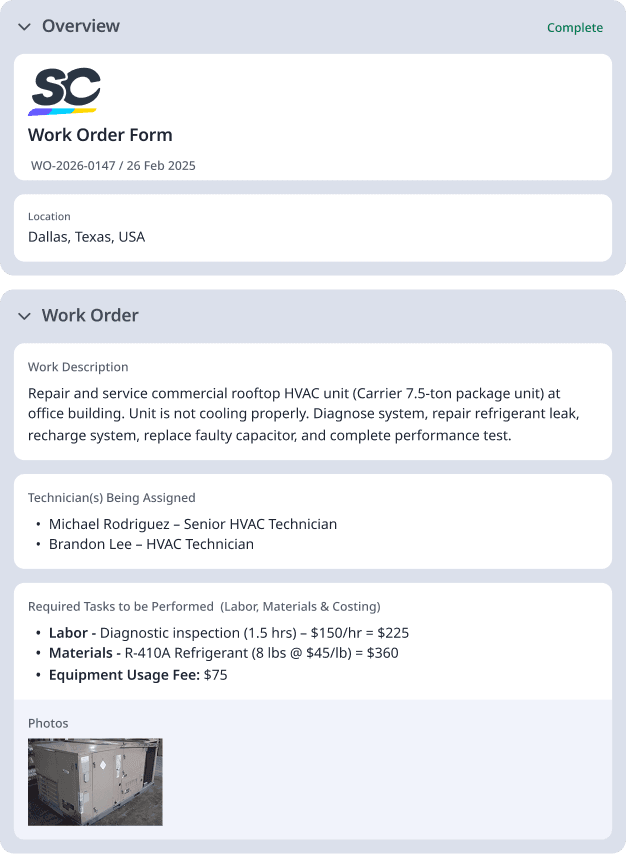
Work Order Form Example
A typical work order form example might show:
Work Order #: WO-2026-0147
Date Issued: February 26, 2025
Location: Dallas, Texas, USA
Work Description: Repair and service commercial rooftop HVAC unit ( 7.5-ton package unit) at office building. Unit is not cooling properly. Diagnose system, repair refrigerant leak, recharge system, replace faulty capacitor, and complete performance test.
Client’s Name - Lone Star Property Management, LLC
Contact Details (Phone Number / Email Address) - (214) 555-7832/maintenance@lonestarpm.com
Required Tasks to be Performed (Labor, Materials & Costing)
Labor:
Diagnostic inspection (1.5 hrs) – $150/hr = $225
Refrigerant leak repair (2 hrs) – $150/hr = $300
System recharge & testing (1 hr) – $150/hr = $150
Materials:
R-410A Refrigerant (8 lbs @ $45/lb) = $360
Dual Run Capacitor (45/5 MFD) = $65
Sealant & fittings = $40
Equipment Usage Fee: $75
Subtotal: $1,215
Sales Tax (8.25% TX): $66
Total Estimated Cost:$1,281
Technician(s) Being Assigned
Michael Rodriguez – Senior HVAC Technician
Brandon Lee – HVAC Technician
Authorization of Work to Commence - Work will begin upon signed approval. Estimated start date: February 28, 2026. Estimated completion: Same day.
Client Representative - Sarah Thompson
Work Order Prepared By - Daniel Carter, Service Operations Manager