What is an Incident Report Form?
An incident report form is a formal document used to capture the details of an unexpected event—such as an injury, near-miss, property damage, or hazard—that has occurred in a workplace. More specifically, it documents what happened, when, where, who was involved, and what extent of harm or risk that resulted. An incident report form serves as an official record for investigations, root cause analysis, corrective actions, and regulatory compliance.
In short, when something unexpected happens in your operations, the incident report form is your structured way of documenting it.
What’s Included in an Incident Report Form
A good incident report form will be structured to ensure you capture all necessary details. With this, what information should be included in an incident report checklist?
1. Basic incident details
Date and time of occurrence.
Exact location (site, area/room) where the incident happened.
Incident type (injury, near-miss, property damage, hazard, security breach etc)
2. People involved and witnesses
Names, roles/departments, and contact details of affected persons.
Names and statements of any witnesses.
3. Description of incident
Objective description: what happened, how, and why/what contributed. (Avoid blame and stick to facts.)
Any injuries or damage: nature, location, severity.
Photos, diagrams, or attachments of the scene/evidence
4. Immediate actions taken
What was done right after the incident (first aid, containment, machine shutdown, hazard marking).
Who responded, when, and how.
5. Root cause/contributing factors
What conditions or behaviours contributed? E.g., wet floor, lack of guardrail, operator error, inadequate lighting.
Often using the “5-Whys” or similar analytic method.
6. Corrective and preventive measures
What will be done (or has been done) to prevent recurrence?
Responsibilities assigned, deadlines, and follow-up plan.
7. Sign-off/verification
Person completing the form, date, and perhaps supervisor approval.
Notes on review or link to further investigation.
The above aligns with best-practice guidance: include date/time/location; names; objective description; supporting evidence; actions & recommendations. Using a template helps standardize reporting, reduce missing information, and streamline review.
How to Fill Out an Incident Report Form
Here’s a step-by-step guide to completing the form thoroughly and effectively:
Step 1: Begin immediately after the incident
Respond to the incident (stabilise injury, secure hazard) first.
Then initiate the report while details are fresh, since delays can reduce accuracy.
Step 2: Identify the basic information
Fill in date, time, location, and type of incident.
Record your name & role as the reporter.
Step 3: Capture involved parties and witnesses
List everyone involved (employees, visitors, contractors).
Collect witness contact details and statements (or notes) as soon as possible.
Step 4: Describe what happened
Use clear, objective, factual language. Avoid assumptions or blame.
Outline sequence: what led up to the event, what occurred, what followed.
Note any injuries/damage. Attach photos or evidence where available.
Step 5: Record immediate actions
What first-aid or emergency response occurred?
Was the equipment shut off or hazard isolated?
Who notified (supervisor, safety officer)? When?
Step 6: Analyze contributing factors
What conditions (environmental, human, mechanical) contributed?
Ask “why” until you reach the underlying cause.
Document findings in the relevant section of the form.
Step 7: Recommend and document preventive measures
Propose corrective actions (e.g., fix guardrail, retrain staff, change procedure).
Assign responsibility, timeline, and follow-up date.
If part of a safety management system, link to further investigation or tracking.
Step 8: Review and sign off
Ensure the reporter, supervisor, or safety manager reviews the completed form.
Store the form in a central location or system (digital if available) so it’s accessible for audits, trends, and insurance.
Follow up to check that preventive actions were implemented.
Best Practices
When completing an incident report, it’s important to use objective and neutral language, avoid guessing or attributing motives to individuals. Be specific and factual rather than vague; for instance, instead of writing “someone slipped,” specify that “Employee A slipped on water on the floor adjacent to the loading bay because the spill was not marked.”
Whenever possible, include visual evidence such as photos or diagrams to support the report. Treat near-miss incidents with the same level of detail and seriousness as actual incidents, as they provide valuable insights for prevention. Always keep copies of incident reports, since they may be required later for regulatory, insurance, or legal purposes.
Finally, promote a culture of prompt and honest reporting; concealing incidents undermines learning and prevents the organisation from improving its safety practices.
Incident Report Form Example
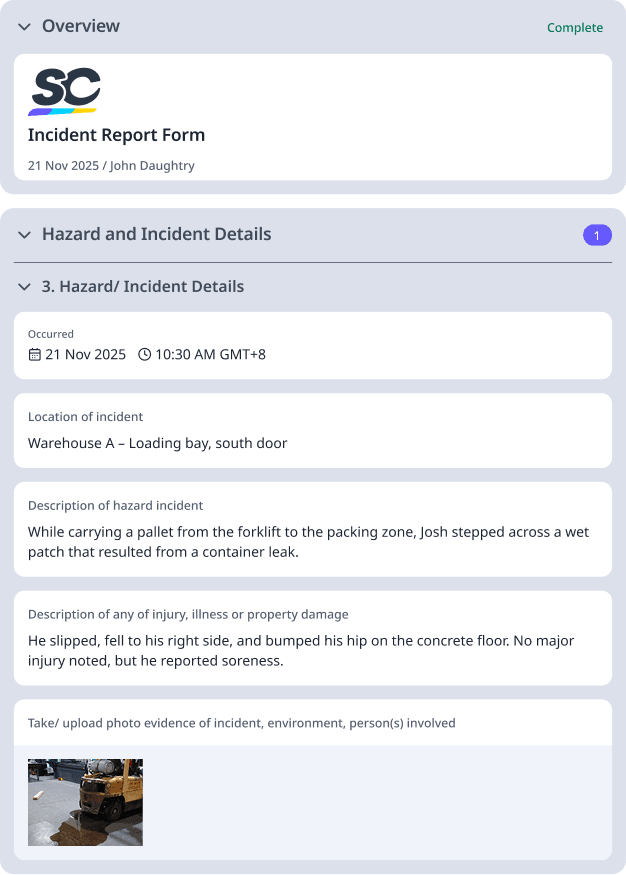
Date/Time: 21-Nov-2025, 10:15 am
Location: Warehouse A – Loading bay, south door
Involved: John D., Forklift Operator, Dept Logistics; Witness: Mary S., Picker
Incident Description: While carrying a pallet from the forklift to the packing zone, John stepped across a wet patch that resulted from a container leak. He slipped, fell to his right side and bumped his hip on the concrete floor. No major injury noted, but he reported soreness.
Immediate Action: Spill contained, area cordoned off and cleaned, supervisor notified within 5 minutes. John was escorted to first-aid for evaluation.
Contributing Factors:
Leak not tagged or cleaned promptly.
Forklift traffic in the area increased risk.
Preventive Measures:
Install drip-tray under the leaking container and schedule daily inspection for leaks.
Update site procedure: forklift operators to inspect walkway before operations.
Responsible: Logistics Supervisor – due 25-Nov-2025